VoidNotch Features GitHub
English
Try it What's new Pricing
macOS 14+ · Apple Silicon · Free & Pro

Know which agent is waiting for you.

Claude Code, Codex, pi, Grok and Hermes in one glance: who is running and who needs you.

Agent status, AI quota and system health in the notch, the menu bar, or a draggable Floating Gauge.

Download free for macOS Get Pro · $15 MIT source (v0.6.0)

Pro is a one-time licence, not a subscription. 5-day trial, no card.

Scroll to wake it up
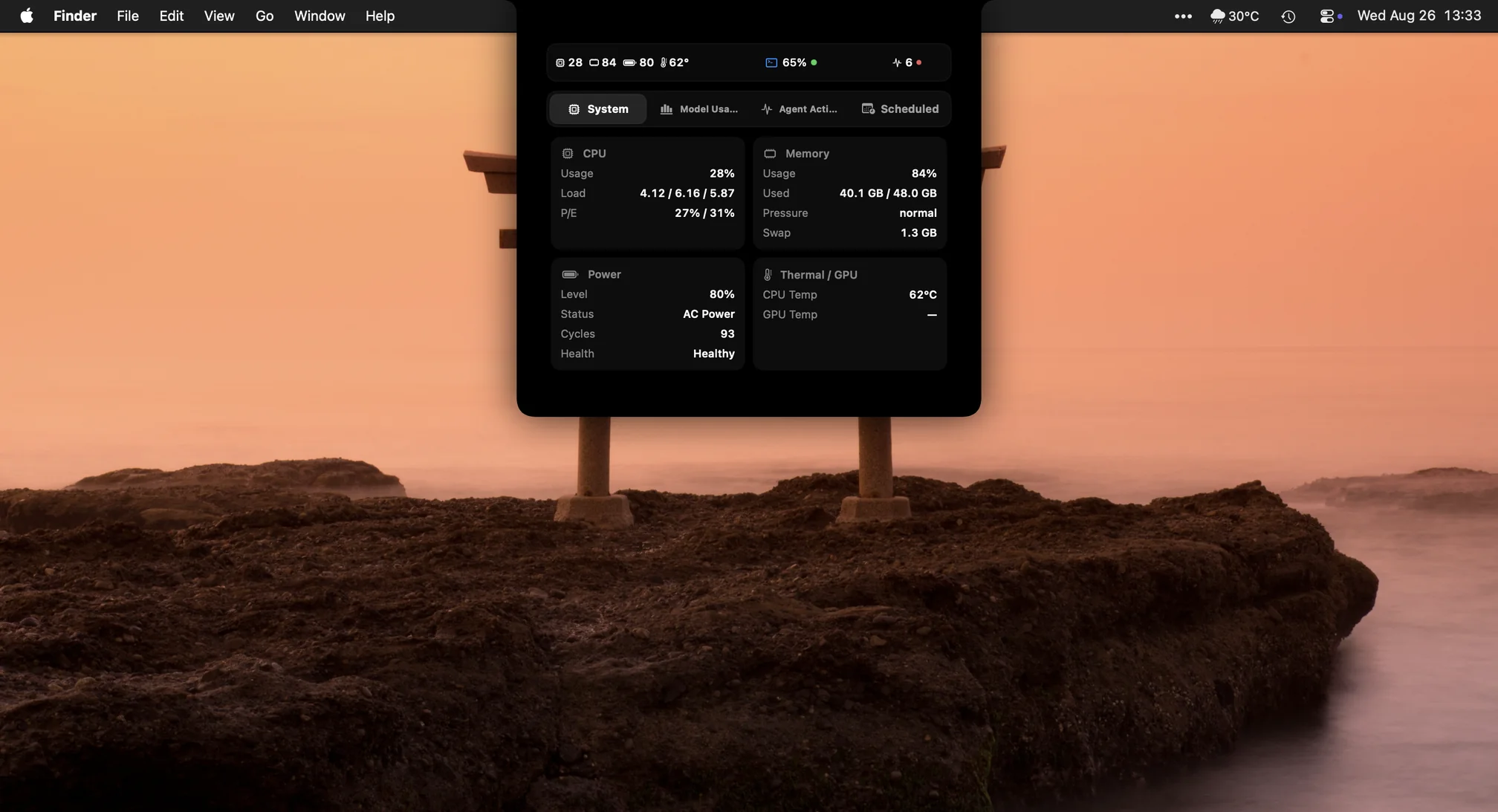
Real macOS desktop capture with VoidNotch open on the System tab
01 · The notch

The black glass you already have. Now it talks.

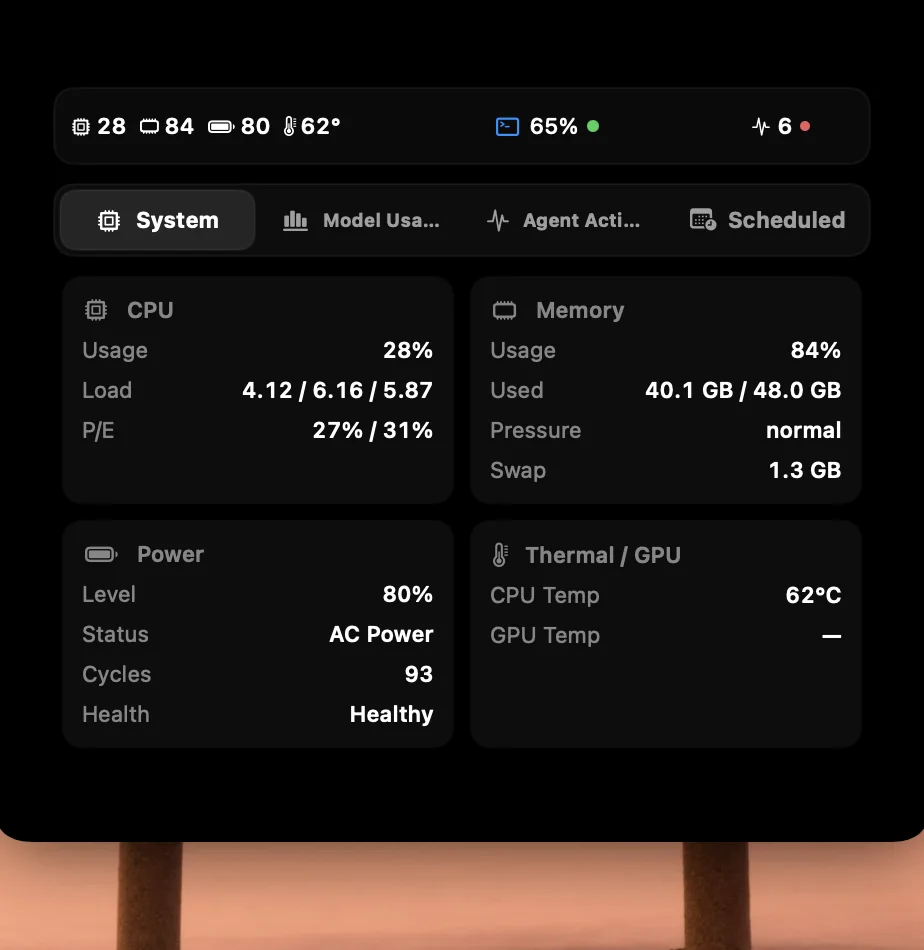
CPU, memory, battery and AI usage on either side of the notch. You choose what goes left and right, and how wide.

Real screenshot of the VoidNotch panel on the System tab
02 · Agents

An agent is waiting. The notch speaks first.

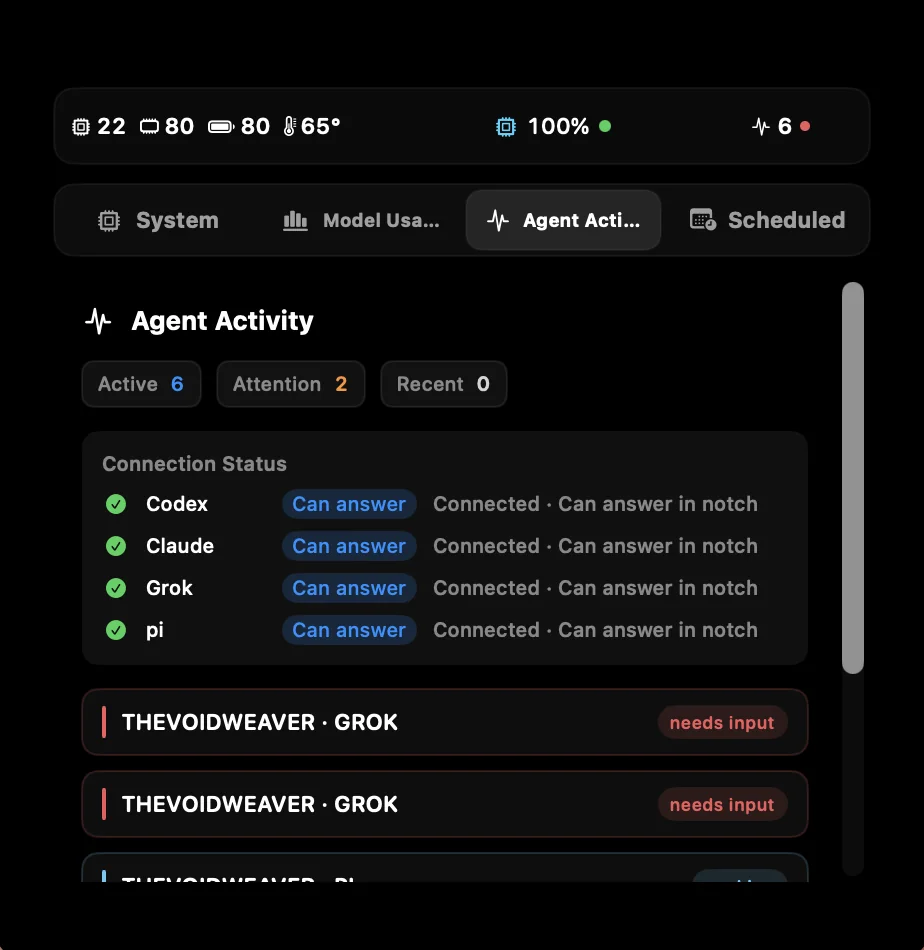
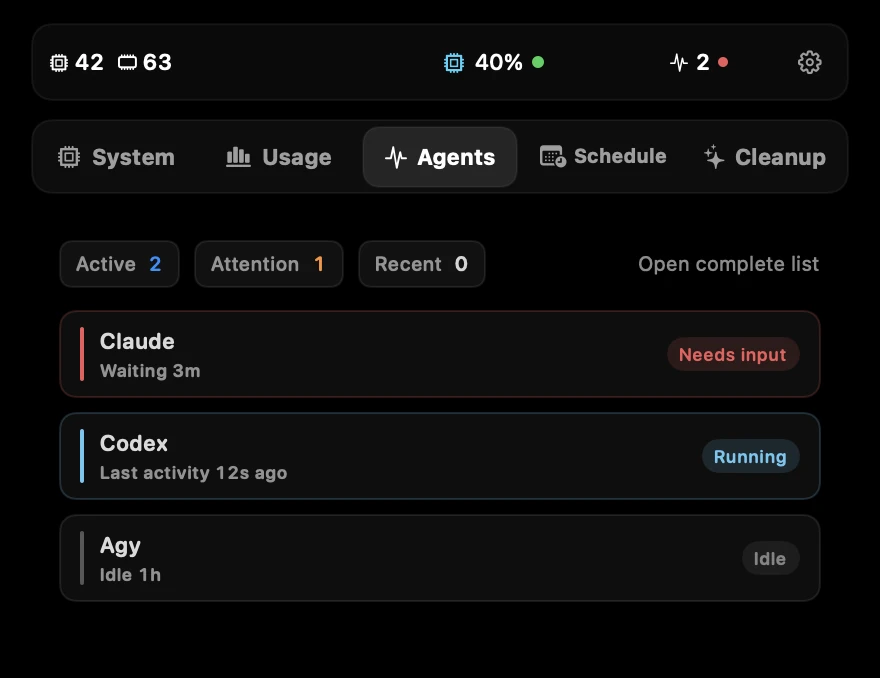
See Claude, Codex, pi, Grok and Hermes at a glance: running, waiting for you, failed, quota limit. When one needs you, the notch expands, changes colour and plays the voice alert you picked. Everything pending lands in one list window.

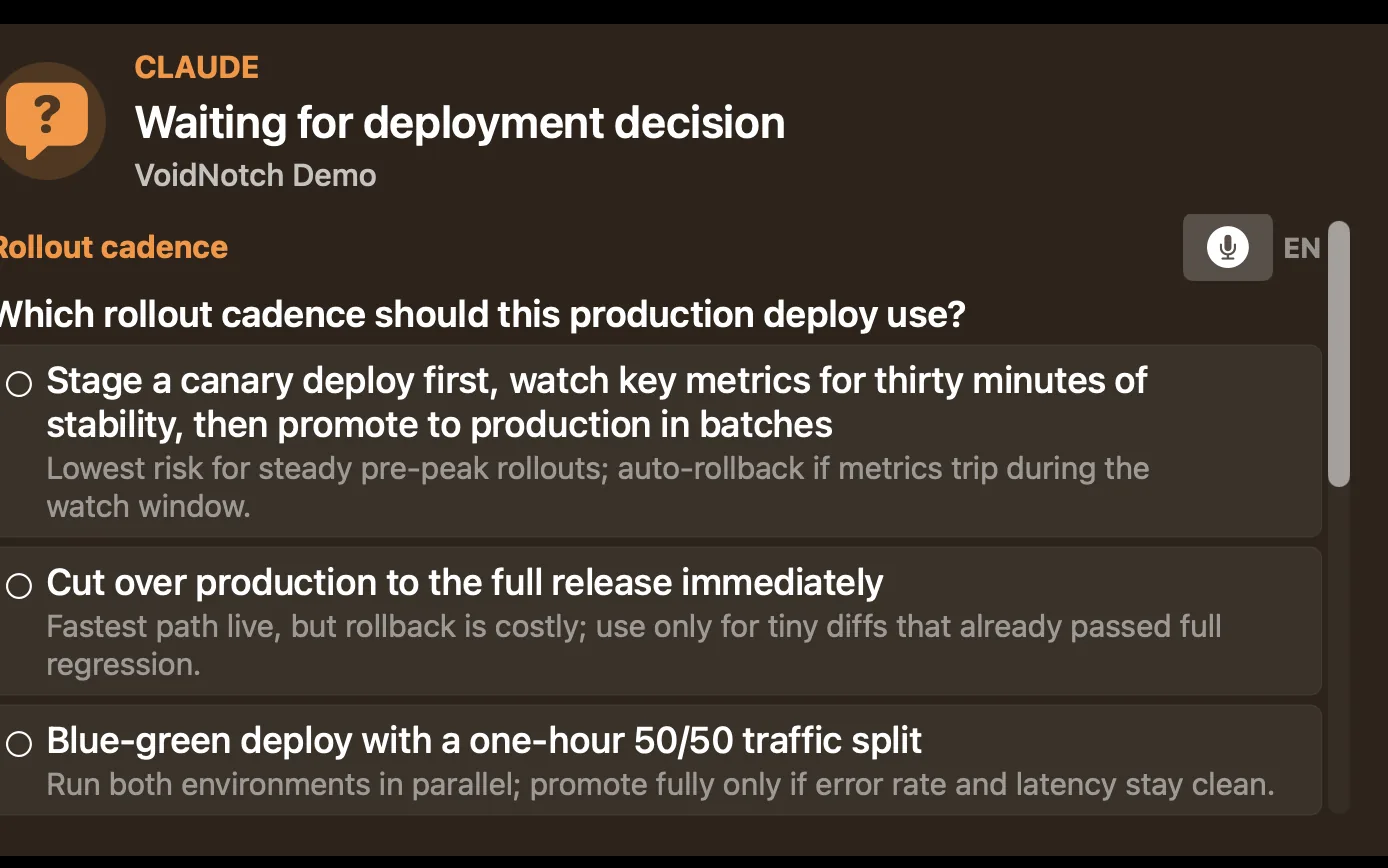
Proanswer Claude, Codex and pi prompts right in the notch, without switching back to the terminal.

Real screenshot of the VoidNotch panel showing agent activity Real screenshot of the Pro agent answer card in VoidNotch
03 · Quotas

Know before a quota runs out.

Set used-percentage thresholds (50/80/90/95 by default). When a quota window crosses one, the notch expands with the provider, the window and the reset time, once per cycle.

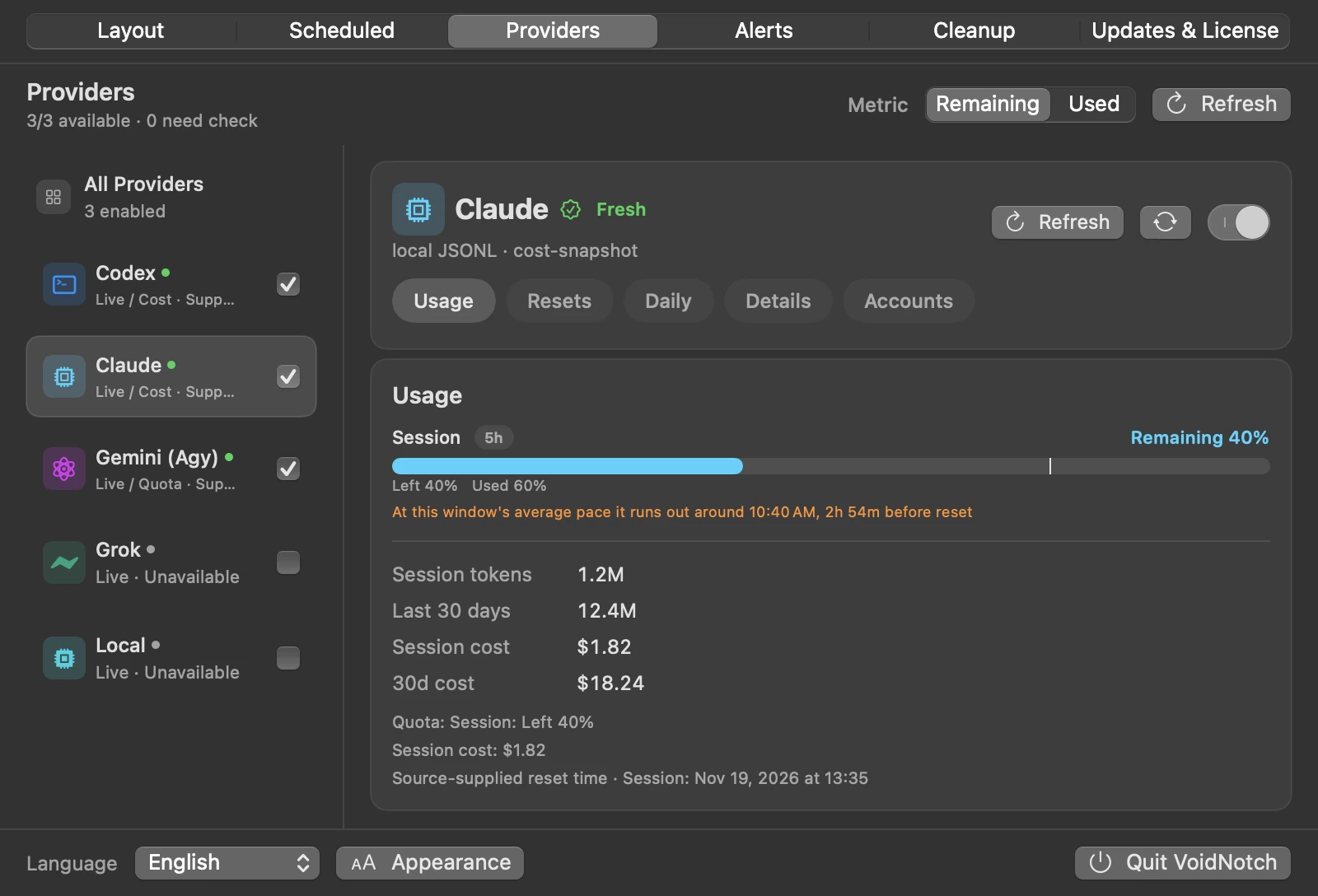
Proa runway forecast estimates from your average pace when a window will run out, and can warn you once per window.

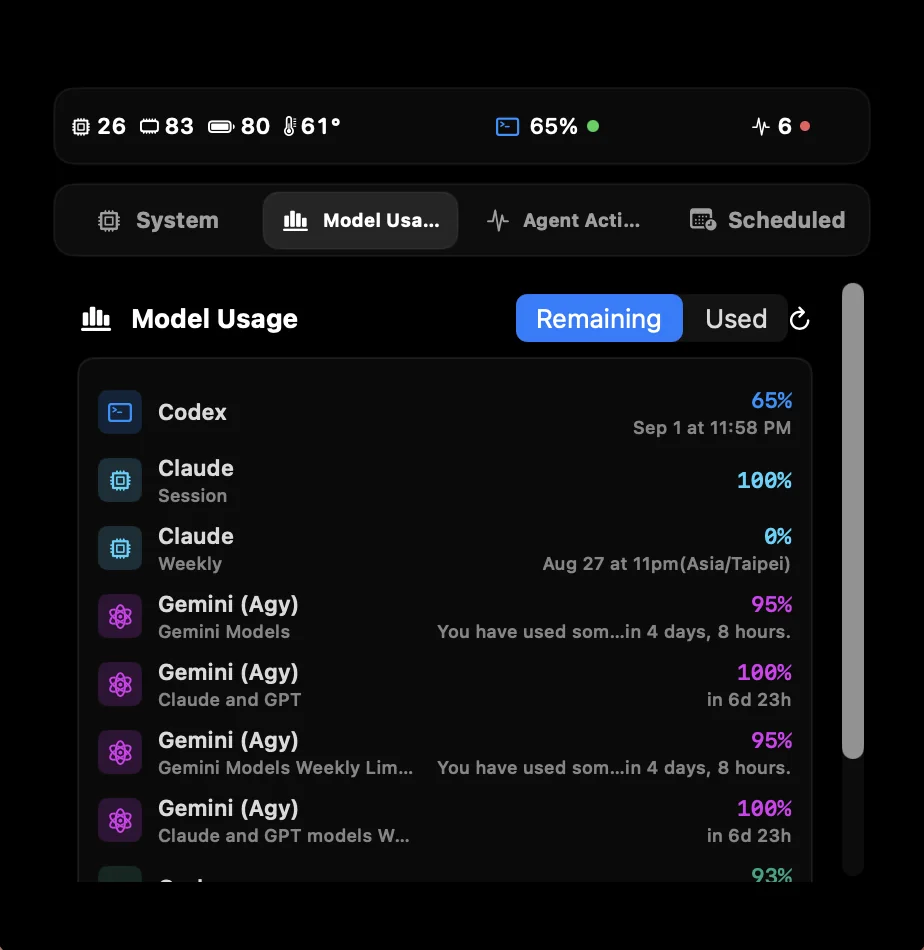
Real screenshot of the VoidNotch panel showing remaining provider usage Real VoidNotch notification card showing Gemini quota exhausted
04 · Floating Gauge

No notch? It draws one. Or floats anywhere.

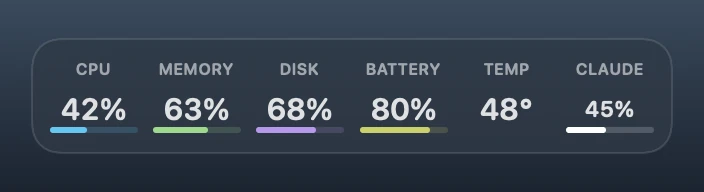
On an iMac, a Mac mini or an external display, VoidNotch draws a virtual notch or a Dynamic Island shape at the top of the screen. You can also reveal it on hover, or hide it. Drag the Floating Gauge anywhere. Its Clean style sizes text to the preset, and values stay white until they cross a threshold.

Real screenshot of the VoidNotch Floating Gauge
05 · Local

Everything is read on your Mac.

Usage and agent status come from local CLI and session data. No telemetry, no analytics backend.

Download free. Go Pro when you want it.

Download Free Get Pro · $15

One-time licence · up to 3 Macs · 5-day trial, no card

Real VoidNotch notification card showing Codex integration tests passed Real VoidNotch notification card showing the Grok deploy interrupted
Interactive demo

Click the notch. It opens like the app.

A working HTML replica of the VoidNotch notch. Open the panel, switch tabs, then trigger the alerts an agent or a quota would raise and answer them. Every number is simulated demo data, not a reading from your Mac.

28 84 80 62° 65% 4

CPU

Usage
28%
Load
4.12 / 6.16 / 5.87
P/E
27% / 31%

Memory

Usage
84%
Used
40.1 GB / 48.0 GB
Pressure
normal

Power

Level
80%
Status
AC Power
Health
Healthy

Thermal / GPU

CPU Temp
62°C
GPU Temp
—
Simulated data

Make something happen

Display

Without a notch, VoidNotch moves to the menu bar and the Floating Gauge. Drag the gauge around the desktop.

What's new

0.19.0

Quota runway forecast and daily usage CSV export

  • New (Pro): quota runway forecast. It estimates from your average pace when a window runs out and whether it lasts until reset, and can warn you once per window. The notch's all-providers list marks windows expected to run out early in orange.
  • New (Pro): export daily tokens and cost as CSV from Token stats, by date and provider.
  • New: choose a notch or Dynamic Island shape for displays without a notch. The change applies immediately.
  • New: click a row in the notch's all-providers list to open that provider's usage card, heatmap and cost trend.
  • New: Device Cleanup covers web engine caches of Electron apps and Chrome's on-device AI models, and shows free disk space before and after a cleanup.
  • Improved: the Keychain permission for Claude Desktop sign-in is requested only once, and you can turn off remembering the key in the Claude provider's Details tab.
  • Fix: the virtual notch no longer leaves a black block after sleep or display changes, and choosing Hidden now takes effect immediately.
  • Fix: Claude reset credits no longer show an empty list when fields are missing, and credits that have not started yet are listed.
  • Fix: safer cleanup. Caches of macOS system services, VPNs and virtual machines, the Yarn Berry global cache and browser updates waiting to be applied are no longer offered.
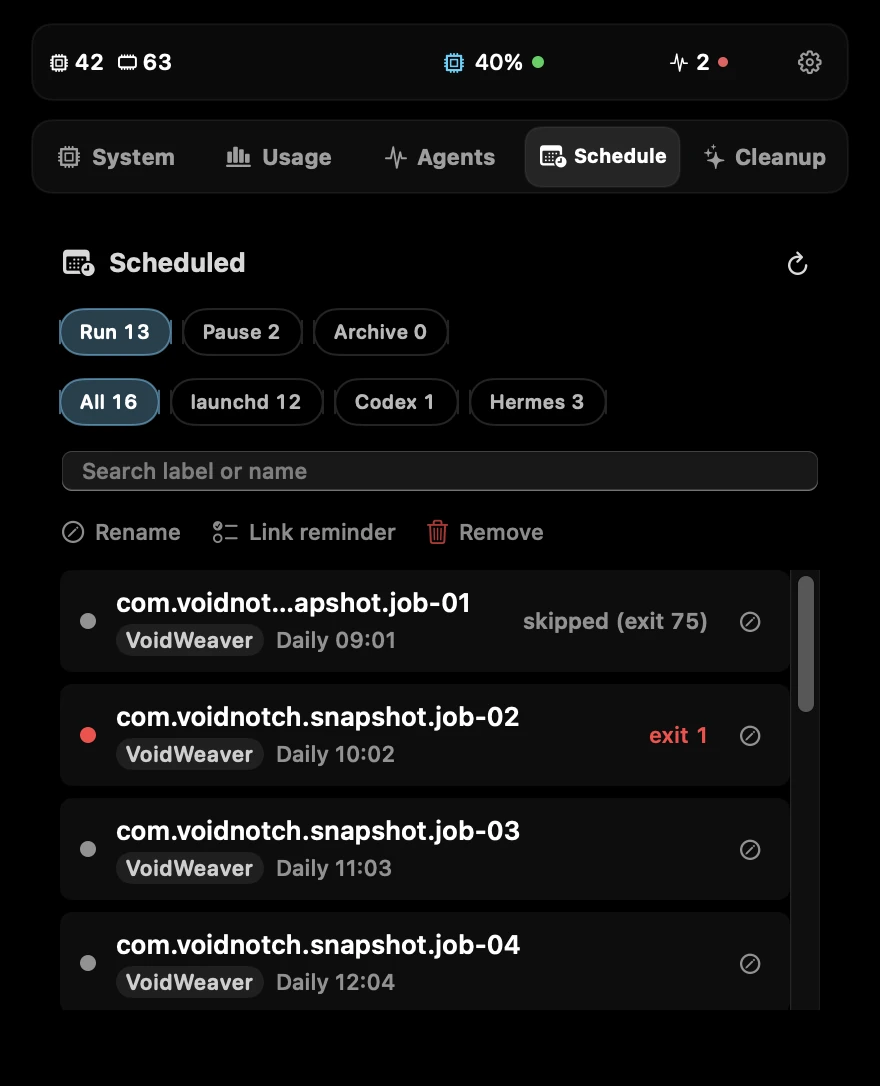
  • Fix: scheduled jobs that exit with status 75 show as Skipped instead of failed.
All release notes

A closer look

Rendered straight from VoidNotch's interface code with demo data. These are not mockups, and every number is an example, not a measurement.

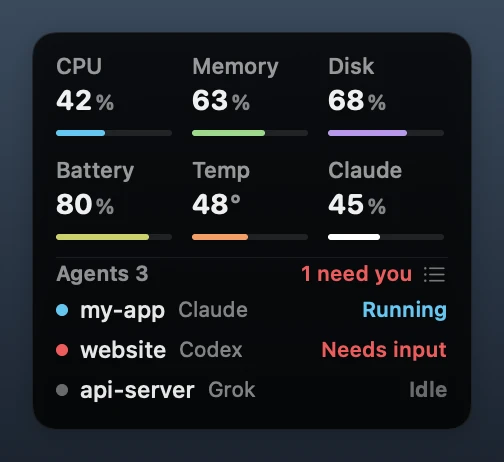
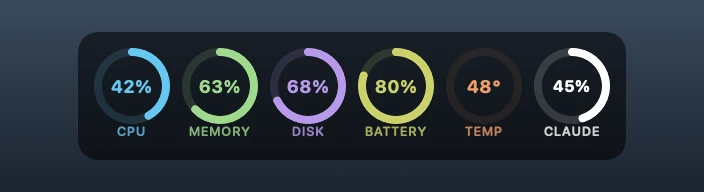
VoidNotch Floating Gauge with three agent sessions, rendered with demo data

Floating Gauge

CPU, memory, disk, battery, temperature and AI usage in one place, with the agents that need you listed underneath.

Four looks

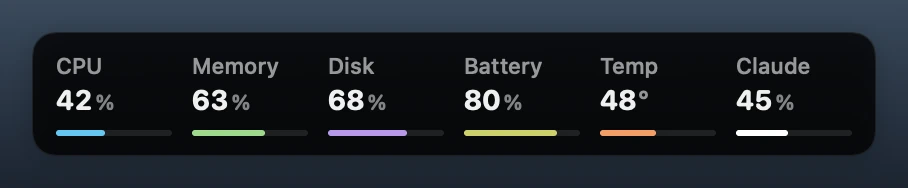
Floating Gauge in the Clean look, rendered with demo data
Clean
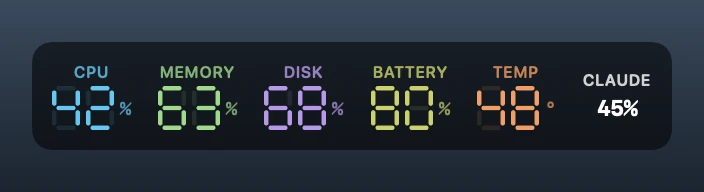
Floating Gauge in the Seven Segment look, rendered with demo data
Seven Segment
Floating Gauge in the Rings look, rendered with demo data
Rings
Floating Gauge in the Glass look, rendered with demo data
Glass

Open the notch

System, usage and agent tabs, one click away.

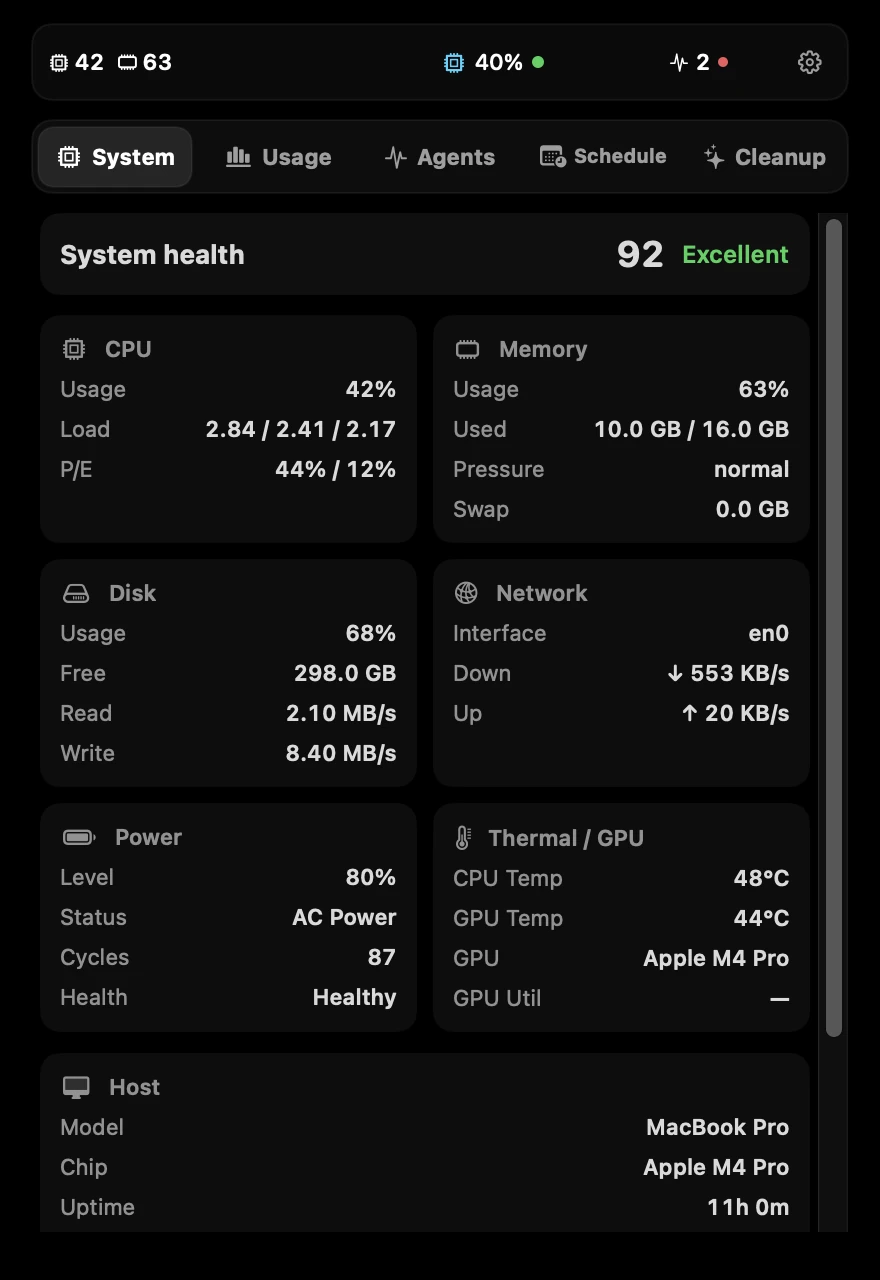
VoidNotch notch panel on the System tab, rendered with demo data

System

Health score, CPU, memory, disk, network, power and thermals.

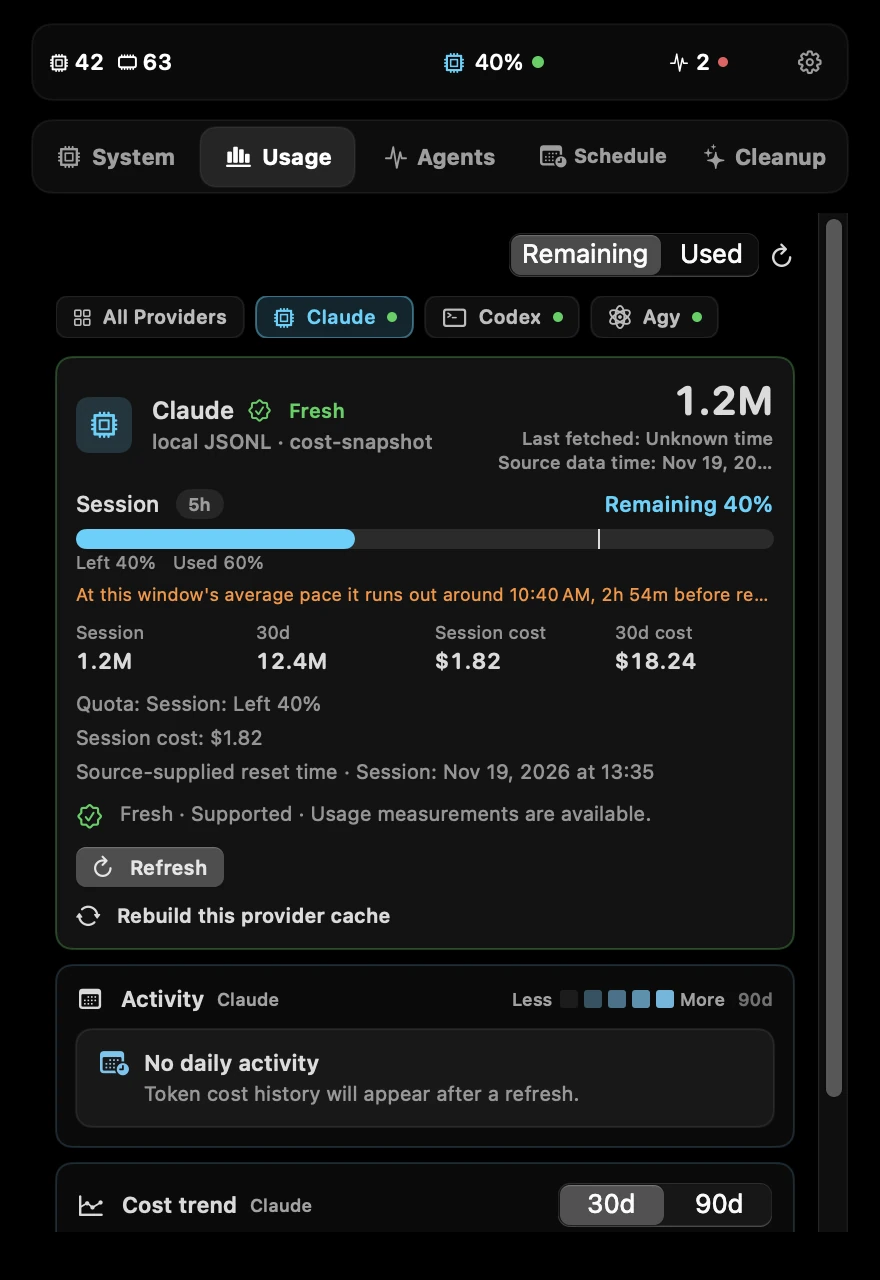
VoidNotch notch panel on the Usage tab, rendered with demo data

Usage

Remaining quota per provider and when it resets.

VoidNotch notch panel on the Agents tab, rendered with demo data

Agents

Which agent is running and which one is waiting on you.

VoidNotch notch panel on the Schedule tab, rendered with demo data

Schedule

Your launchd jobs and your agents' scheduled tasks, with the last exit status.

Inside Settings

Usage, alerts and cleanup, each on one screen.

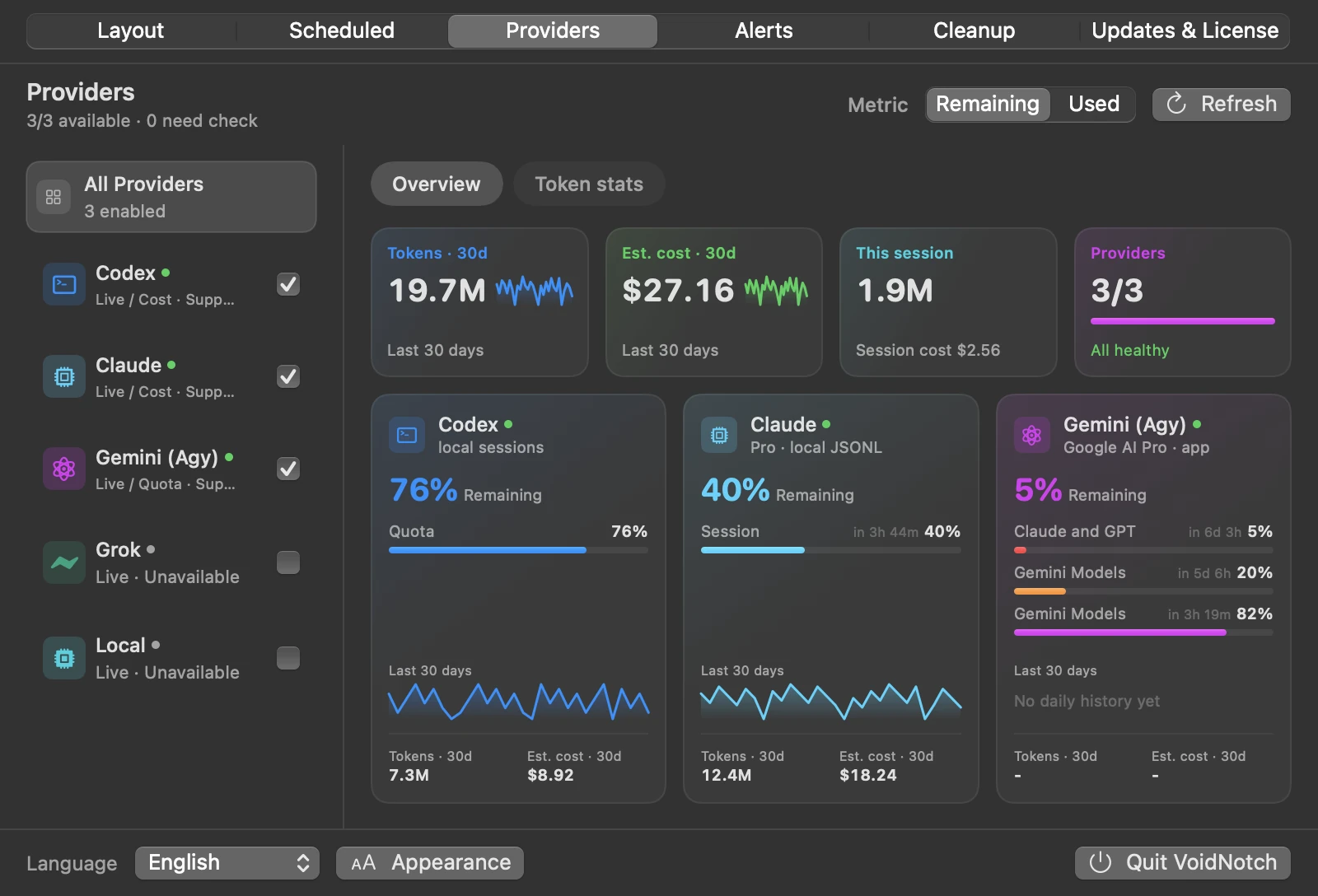
VoidNotch Providers overview settings page, rendered with demo data

Providers dashboard

30-day tokens, estimated cost and provider status on top. Below, one card per provider with every quota window and its reset time.

VoidNotch Claude usage settings page with a quota runway forecast line, rendered with demo data

Quota runway forecast Pro

At your average pace, will this window last until it resets? VoidNotch estimates when it runs out and marks windows expected to run out early in orange.

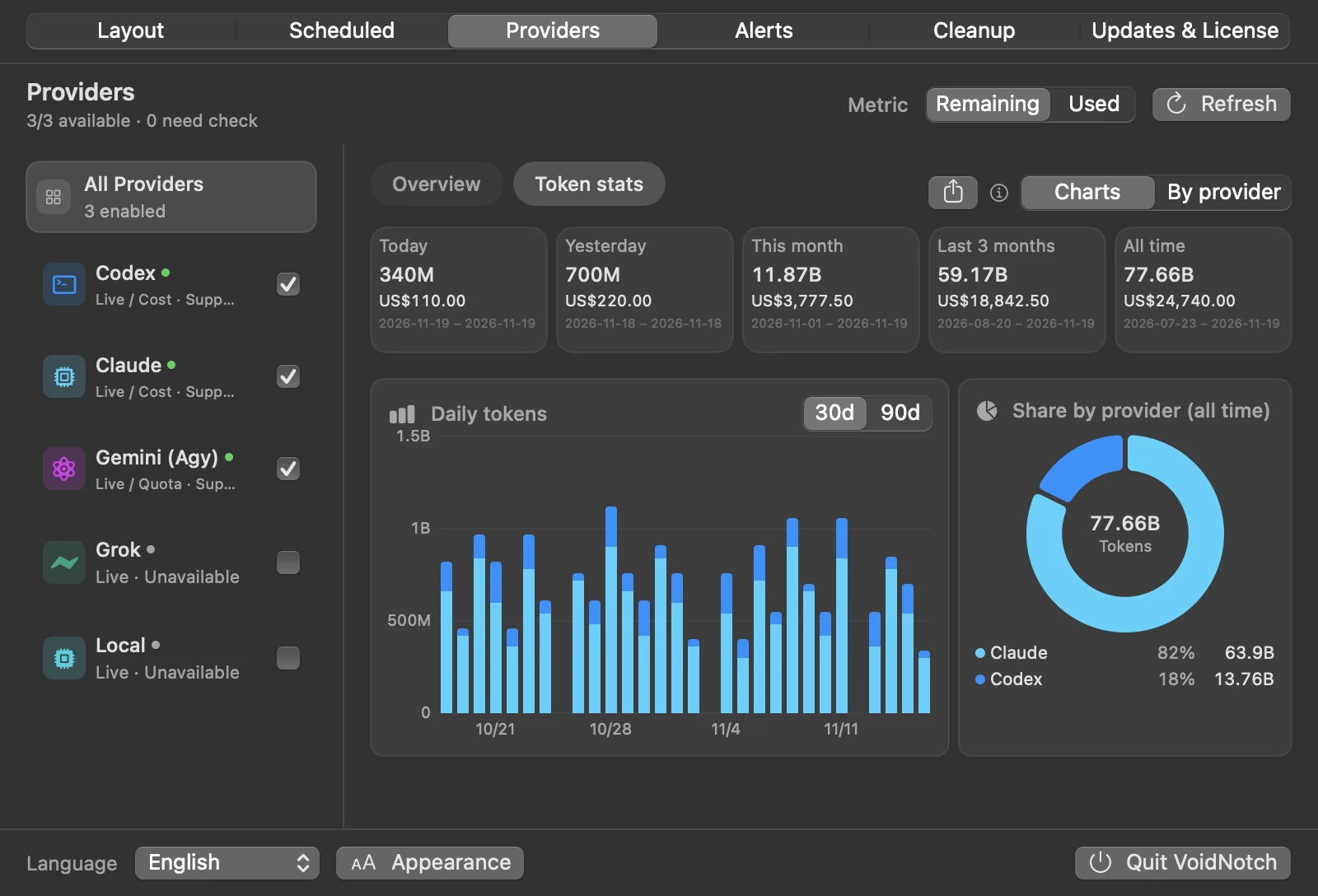
VoidNotch Token stats settings page, rendered with demo data

Token stats

Daily tokens, cost and provider share, read from your local Claude and Codex logs.

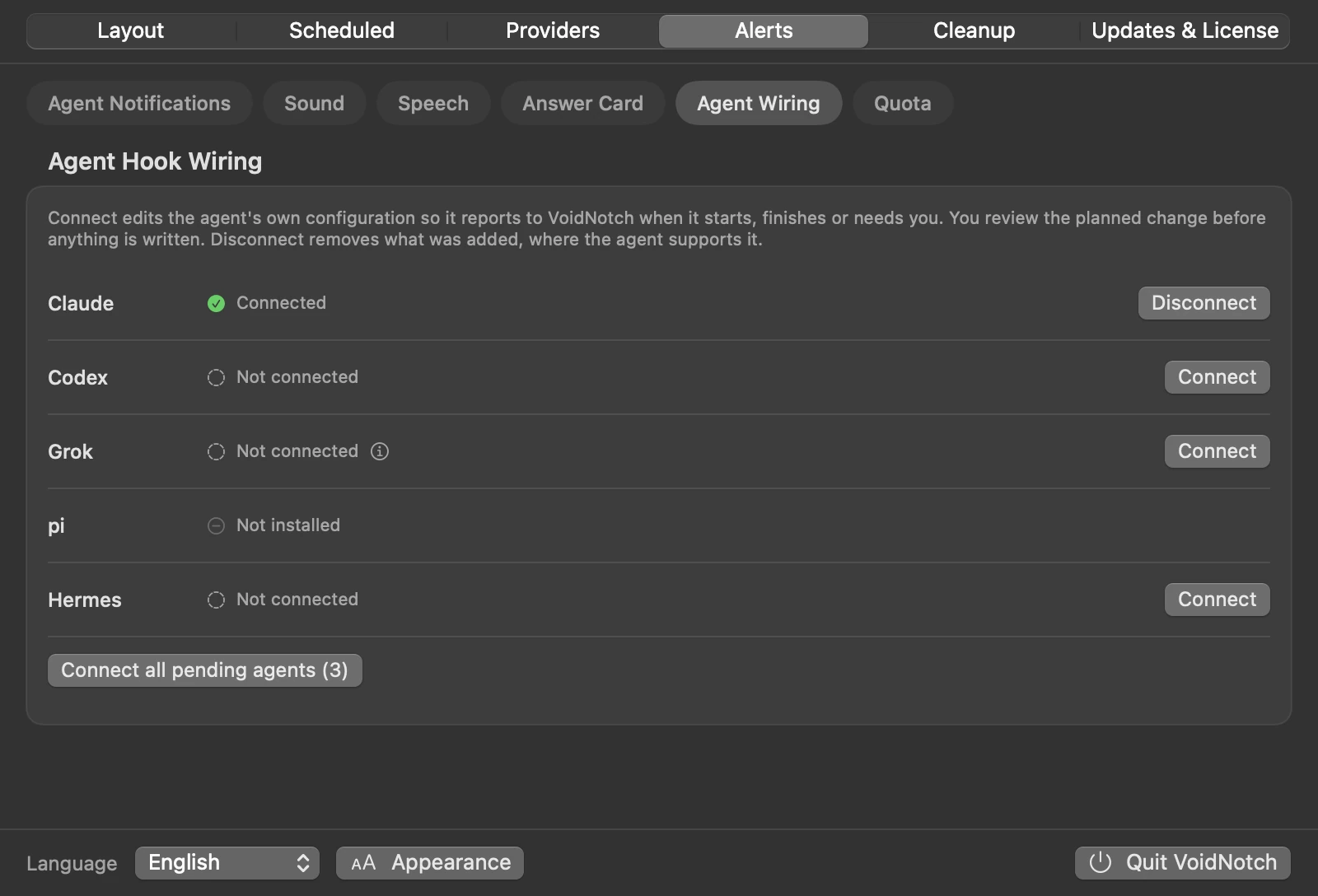
VoidNotch Agent Hook Wiring settings page, rendered with demo data

Agent wiring

One button per agent connects Claude, Codex, Grok and Hermes. You review the planned change before anything is written.

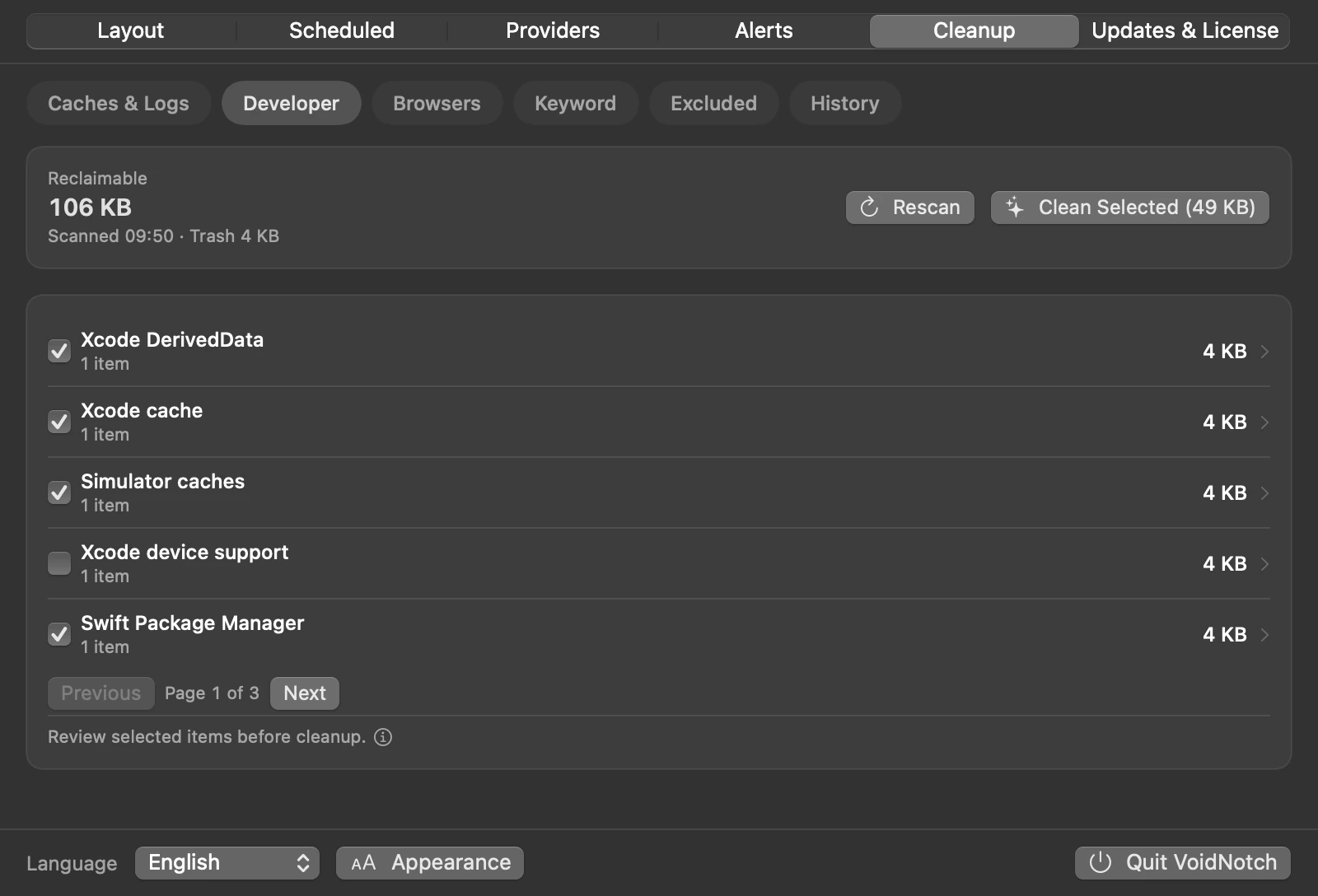
VoidNotch Device cleanup settings page on the Developer tab, rendered with demo data

Device cleanup

Scan caches, logs, developer-tool and browser leftovers, pick what to remove, then confirm. Items go to the Trash.

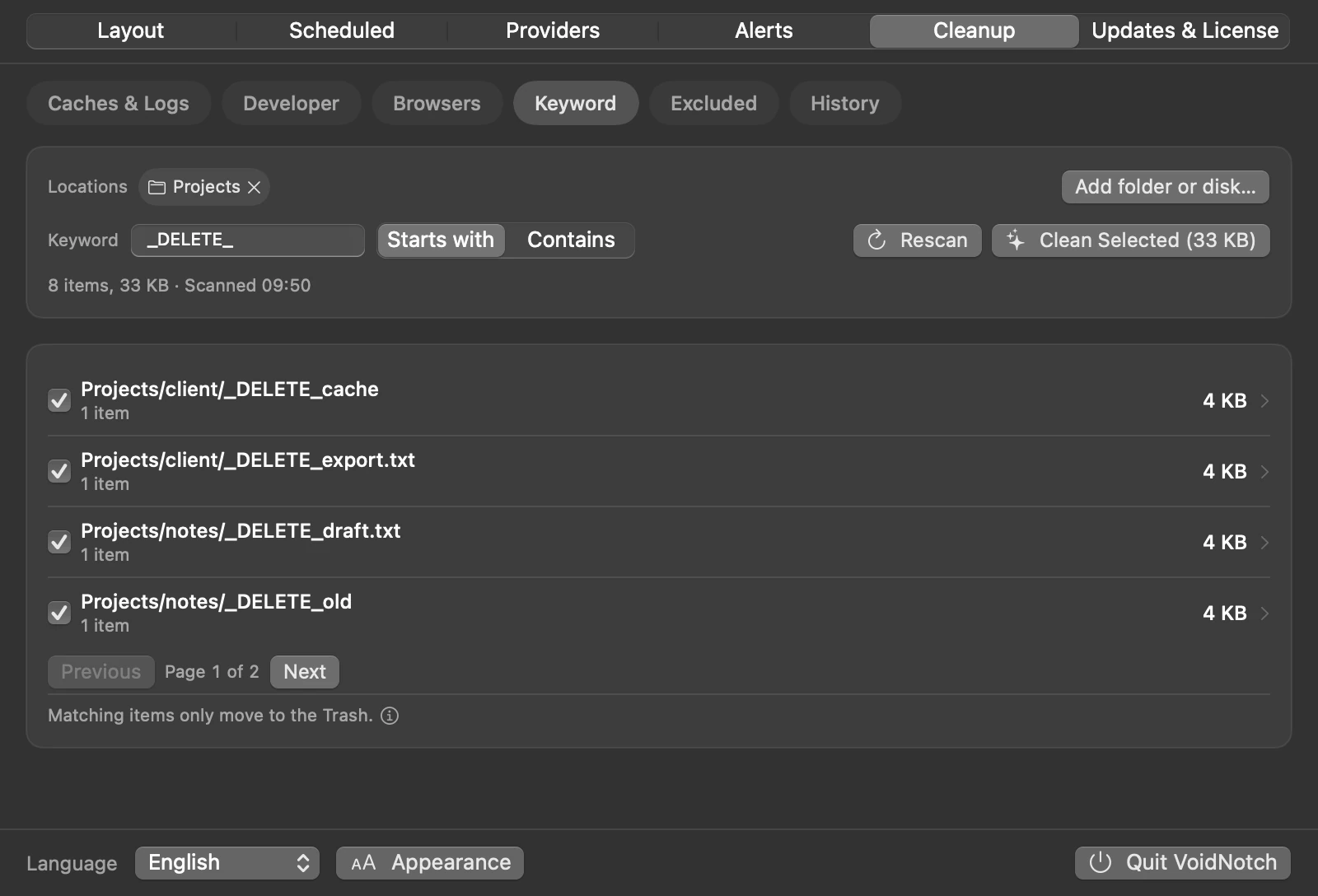
VoidNotch Keyword cleanup settings page, rendered with demo data

Keyword cleanup

Find what you marked with a keyword such as _DELETE_ and move it to the Trash in one go.

Demo data. Rendered from VoidNotch 0.19.0 source.

What else it does

Added between versions 0.11 and 0.19.

Agent Attention inbox

Everything that needs you, in one window. Each item says what to do next: handle it in the terminal, just read it, or with Pro, answer right there. Handled items clear themselves.

Schedule overview

launchd jobs and the scheduled tasks of your wired Hermes, Codex and Claude agents in one searchable list. Rename a job, link it to Reminders, or archive it. Agent tasks are read-only.

Reset credits

Lists your Codex and Claude rate-limit reset credits with expiry and remaining count. Redeeming always asks for confirmation first.

Device and keyword cleanup

Caches, logs, developer-tool and browser leftovers, or anything you tagged with a keyword. An exclusion list protects what you never want cleaned.

Displays without a notch

Pick a notch or Dynamic Island shape. Show it always, on hover, or not at all, on the main display or the one under the pointer.

Six interface languages

English, Traditional Chinese, Simplified Chinese, Spanish, French and Brazilian Portuguese.

Verified in-app updates

Update in one step. Each download has to pass Gatekeeper as an Apple-notarized build and match its file hash before it is installed.

Local models

oMLX is listed as a provider and shows its session tokens.

Every provider you already pay for.

Claude · Codex · Gemini (Antigravity) · Grok, and more via CodexBarCore, on a best-effort basis.

Claude Codex Gemini (Antigravity) Grok + CodexBarCore
Usage figures are read from local CLI and session data on a best-effort basis. Providers change their formats without notice; unsupported ones are labelled clearly, never shown as a fake 0%.

Local by default. Honest about the network.

Usage and session figures displayed in the app are read from local CLI and session data on your Mac. There is no VoidNotch telemetry and no VoidNotch analytics backend for product usage.

Polar is contacted for licence activation, validation, and deactivation. Provider or runtime components you already use may make their own network requests independently of VoidNotch.

Read the source.

The monitoring core is published on GitHub under the MIT licence: system metrics, the notch interface and usage reading. Check what it reads, or build it yourself.

View on GitHub

The download on this site is built from newer, proprietary sources. The footer states what the MIT licence covers.

Free forever. Pro once.

One-time perpetual licence for up to 3 Macs. Tax is calculated by Polar at checkout. Voluntary 14-day refund. Try Pro locally for 5 days / 120 hours without a card.

Free

Free, forever
No account, no expiry
  • Full notch and menu bar HUD
  • CPU, memory, disk, network, battery, health, processes
  • Live AI usage for every supported provider (best-effort), plus token and cost charts for Claude and Codex
  • Live agent status for Claude, Codex, pi, Grok and Hermes, with voice alerts
  • One-click hook wiring and connection diagnostics
  • Schedule overview, device and keyword cleanup, reset credits
  • Download it. No build required.
Download Free

Free to download and use. The MIT licence covers the code published at tag v0.6.0 only, and that grant is irrevocable for that code. Later versions are proprietary.

One-time licence

Pro

Everything in Free, plus the tools for people who run agents all day.
  • Answer agent prompts in the notch. Approve a Codex edit or pick a Claude option without leaving what you are doing. Works across Claude, Codex and pi.
  • Quota runway forecast: see whether a window lasts until reset, with an early warning once per window
  • Export daily tokens and cost as CSV, by date and provider
  • Cleanup history: a record of your recent cleanups, with what was skipped and why
  • Cleanup item details: open a group, see its largest items, reveal or exclude them
  • Perpetual licence for up to 3 Macs. No subscription. 5-day cardless trial in the app
  • Email support
3 Macs
$15 total

Pay once · 3 Macs · 14-day voluntary refund · 5-day trial, no card
Buy Pro · $15 · 3 Macs

Purchase is a licence entitlement. The same notarized app download covers Free and Pro; a licence key unlocks Pro. Checkout is hosted by Polar (Merchant of Record).

Pro is a one-time licence entitlement (not a subscription). Try Pro locally for 5 days / 120 hours. Cardless, no checkout. The public notarized download is a zip containing VoidNotch.app. Download, extract it, move the app to Applications, then open it. Safari usually extracts it automatically.

Prices shown before location-dependent tax. Polar calculates tax at checkout. Voluntary 14-day refund; Polar may separately issue refunds under its buyer terms or chargeback-prevention rights.

Licence keys arrive via Polar receipt email and the Polar customer portal, not on this page after checkout return.

Frequently asked

How much does VoidNotch cost?

VoidNotch is free to download and use. Pro is a one-time licence at $15 for up to 3 Macs, with a 5-day trial that needs no card. Pro is not a subscription.

Which AI agents and providers does VoidNotch support?

Agent status works with Claude Code, Codex, pi, Grok and Hermes through their hooks. Usage and quota are read for Claude, Codex, Gemini (Antigravity) and Grok, and oMLX for local models, on a best-effort basis.

Does my data leave my Mac?

VoidNotch reads usage and agent status from local CLI and session data on your Mac. It has no telemetry and no analytics backend. Polar is contacted for licence activation, validation and deactivation, and the provider tools you already use may make their own network requests.

What is the difference between Free and Pro?

Free includes the notch and menu bar HUD, system metrics, AI usage and quota, agent status with voice alerts, the schedule overview and cleanup. Pro adds answering agent prompts from the notch, the quota runway forecast, daily usage CSV export, and cleanup history with item details.

Does VoidNotch work on a Mac without a notch?

Yes. On an iMac, a Mac mini or an external display, VoidNotch draws a virtual notch or a Dynamic Island shape at the top of the screen. You can also use the menu bar or the Floating Gauge.

How is VoidNotch related to CodexBar?

VoidNotch uses CodexBarCore, the open-source library from the CodexBar project, to read provider usage. VoidNotch adds the notch interface, agent status and alerts, system metrics and the Floating Gauge. They are separate projects.

Is there a notarized download?

Yes. The current public download is VoidNotch v0.19.0 and it is Apple-notarized. The download is a zip containing VoidNotch.app. Download it, extract it, move the app to Applications, then open it. Safari usually extracts it automatically. No Gatekeeper right-click bypass, and no Xcode required. If the in-app update in v0.15.0 or earlier reports a signature or notarization error, download the current version here once; in-app updates work from v0.15.1 on. The MIT licence covers the code published at tag v0.6.0 only.

How does the Pro trial work?

The app can unlock Pro features locally for 5 days (120 hours) without a card or Polar checkout. When the trial ends, Pro features lock until you activate a purchased licence key.

Does it work on Intel Macs?

The public download is arm64 for Apple Silicon only. Intel Macs can run VoidNotch when you build the code published at tag v0.6.0, which is covered by MIT. Later versions are proprietary. The HUD moves to the menu bar when there is no notch, but temperature readings are unavailable because the thermal sensors are read through Apple Silicon's IOHID sensors and the Intel SMC path is not implemented. macOS 14 or later.

Do I need Xcode?

Ordinary use does not need Xcode. Download the notarized zip, extract it, move VoidNotch.app to Applications, then open it. Safari usually extracts it automatically. Xcode is only needed if you build the code published at tag v0.6.0, which is covered by MIT. Later versions are proprietary.

Will you go subscription?

No. Pro is a one-time perpetual licence for up to 3 Macs.

What happens if a provider breaks the format?

That provider degrades to “unavailable” rather than lying to you, and we ship a fix on a best-effort basis. Free and Pro both get it.

Can I get a refund?

Yes. A voluntary 14-day refund. Email support@voidnotch.com with your Polar order or receipt reference. Polar may separately issue refunds under its buyer terms or chargeback-prevention rights.